
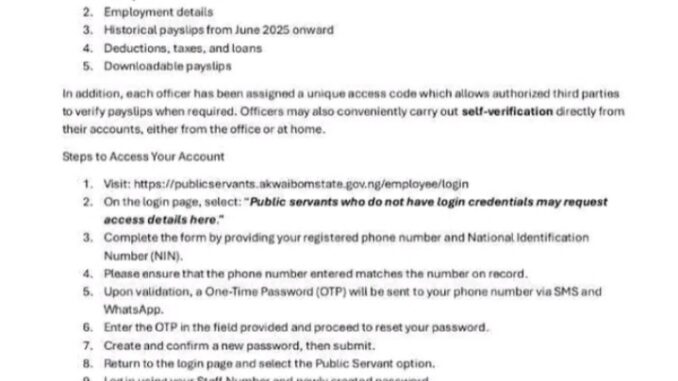
The Akwa Ibom State Ministry of Science and Digital Economy has announced that all active public servants on the Unified State Payroll can now access their individual payroll accounts through the newly launched Public Servants’ Portal. This development is part of the state government’s preparations for the upcoming verification exercise designed to ensure transparency, accuracy, and accountability in salary and employment records.
The digital initiative represents a major step by the Akwa Ibom State Government to modernize payroll administration, empower workers with direct access to their salary information, and eliminate discrepancies that often arise in manual payroll systems.
A Major Step Toward Transparent Payroll Management
According to the Ministry, the Public Servants’ Portal was created to provide secure, convenient, and reafl-time access to payroll information for all government employees enrolled in the Unified State Payroll system.
Through the portal, public servants can independently review, verify, and manage their salary details without relying on intermediaries. This is expected to improve confidence in the payroll process and ensure that workers receive their correct entitlements.
The initiative also supports the forthcoming Public Servants’ Verification Exercise, which aims to confirm the authenticity of employment records, eliminate irregularities, and maintain an accurate database of government employees.
Key Features Available on the Public Servants’ Portal
The portal offers a wide range of features designed to give public servants complete visibility and control over their payroll information. These include:
1. Salary and Allowance Tracking
- Public servants can view their monthly salary payments and allowances in real time. This enables employees to confirm that they are receiving the correct amount and identify any discrepancies immediately.
2. Access to Employment Records
- The platform provides detailed employment information, including job designation, grade level, department, and other official records. This ensures that employment data remains accurate and up to date.
3. Historical Payslip Access
- Employees can access and review their payslips from June 2025 onward. This feature allows workers to track their earnings history and maintain proper financial records.
4. Deductions, Taxes, and Loan Monitoring
- The portal enables users to view all deductions, including taxes, pension contributions, loan repayments, and other adjustments. This promotes transparency and allows public servants to confirm the legitimacy of deductions.
5. Download and Print Payslips
- Public servants can download and print their payslips for personal use, loan applications, official documentation, or financial planning purposes.
Unique Access Code for Secure Verification
One of the portal’s key security features is the assignment of a unique access code to each public servant. This code allows authorized third parties, such as financial institutions, to verify payslip authenticity when necessary.
This eliminates the need for manual confirmation and reduces the risk of document falsification.
In addition, the portal allows public servants to complete self-verification directly from their accounts, either at home or at work. This simplifies the verification process and saves time for both employees and government administrators.
Step-by-Step Guide to Accessing the Portal
Public servants can easily access their payroll accounts by following these steps:
Step 1: Visit the Public Servants’ Portal via:
https://publicservants.akwaibomstate.gov.ng/employee/login
Step 2: Click on the option that says:
“Public servants who do not have login credentials may request access details here.”
Step 3: Fill out the request form using your registered phone number and National Identification Number (NIN). Ensure that your phone number matches the one already in the payroll system.
Step 4: After verification, a One-Time Password (OTP) will be sent to your phone via SMS and WhatsApp.
Step 5: Enter the OTP and proceed to create a new password.
Step 6: Confirm your new password.
Step 7: Return to the login page, select the Public Servant option, and log in using your Staff Number and newly created password.
Once logged in, you will be able to access all payroll features and complete your self-verification.
Deadline for Portal Registration and Verification
Public servants are strongly encouraged to complete their portal registration and verification on or before 15th February, 2026.
Meeting this deadline will ensure seamless participation in the upcoming verification exercise and prevent delays in salary processing.
Government officials have emphasized the importance of compliance, noting that the verification exercise is essential for maintaining a credible and efficient payroll system.
Self-Service Computer Kiosks for Easy Access
To ensure inclusiveness, the Ministry has made provisions for public servants who do not own smartphones, laptops, or personal computers.
Self-service computer kiosks are being deployed across all Ministries, Departments, and Agencies (MDAs) within the state.
These kiosks will allow employees to:
- Access the portal
- Register their accounts
- Verify their payroll details
- Download payslips
This ensures that all public servants, regardless of their access to personal technology, can benefit from the system.
Benefits of the Digital Payroll System
The new payroll portal offers several important benefits, including:
- Improved Transparency
- Public servants can independently verify their salary information, reducing suspicion and uncertainty.
- Increased Efficiency
- Automated systems eliminate delays and reduce paperwork associated with manual payroll management.
- Enhanced Security
The portal uses secure login credentials and OTP verification to protect sensitive information.
Greater Employee Empowerment
Workers can manage their payroll data without relying on third parties.
Accurate Payroll Records
The verification exercise helps eliminate errors, ghost workers, and outdated records.
Strengthening Public Service Through Digital Transformation
The launch of the Public Servants’ Portal reflects the Akwa Ibom State Government’s commitment to digital transformation and efficient public administration.
By adopting technology-driven payroll management, the state aims to improve service delivery, enhance accountability, and ensure that public servants receive accurate and timely salaries.
The initiative also aligns with broader efforts to modernize government operations and promote transparency across public institutions.
Final Reminder to Public Servants
All public servants on the Unified State Payroll are advised to log in, verify their details, and familiarize themselves with the portal before the deadline.
Early registration will help avoid last-minute delays and ensure smooth participation in the verification exercise.
With this digital innovation, Akwa Ibom State is setting a strong example in modern payroll administration, empowering its workforce while promoting transparency, efficiency, and trust in the public service system.
READ ALSO: Kaduna State Scholarship Board Date for 2026 Physical Verification
I have tried to login severally, but I can’t receive the OTP on my phone number. Kindly advise.
Me I can’t even put my employee number,pls what can ido
Same here
Same here
Pls I have tried several times I can’t receive the OTP on my phone pls what can I do
Mine, it is said, account does not exist
Please I mistakenly use my ID card number at the last command instate of staff number, when I discovered,I can’t login again with the first OTP and no other OTP is being sent to me.
Please,what should I do?
I can’t put my employee number, I don’t know what’s to do again, please I need assistance
I can not put my employee number
please I cannot login to my portal , what is the issued and what should I do next so that I CAN HAVE TO MY SALARY DSAHBOARB.KINDLY DO HELP ME.
I can’t type in my employment number. Each time I try to type in the number, the number refuse to display. What do I do, please?
I can’t put my employee number and I’m unable to upload the password
I missed setting the password and I cannot log in. Kindly help. Thank you
Pls I can not put my employee number